Syllaby vs ChatGPT: Pick the Right Tool for the Job
The Syllaby vs ChatGPT decision is less about which model is smarter and more about which one finishes the job. This guide walks through real scenarios, an honest capability matrix, and the tradeoffs most reviews skip.
Most “X vs Y” comparisons flatten the choice into one winner. The truth is that the best pick depends on where your video process actually gets stuck. Start with the scenario closest to your week.
1. Research-heavy explainer
Pick: ChatGPT. When the script needs original angles, sources and counter-arguments, ChatGPT’s broad reasoning earns its keep. Syllaby AI can structure the result afterwards, but the thinking phase belongs to the general assistant.
2. Daily faceless shorts
Pick: Syllaby AI. Once you know the topic, Syllaby AI moves from hook lines to voiceover to captioned scenes without leaving the browser. ChatGPT gives you text, then disappears; everything after the words is your problem.
3. Repurposing one idea into many formats
Pick: Syllaby AI. A single Syllaby AI draft can become a short, a long-form outline and a caption set. Recreating the same idea in ChatGPT means either a very long prompt or manual rewriting for every format.
The two honest starting points
Syllaby AI
Best when the deliverable is a finished video.
One pipeline for script, voiceover, captions and assembly
Templates encode platform-specific pacing and hooks
Faceless video is a first-class workflow
Weak for open-ended research and analysis
Not a general-purpose assistant outside video
ChatGPT
Best when the deliverable is still an idea.
Strong reasoning, breadth and summarisation
Free tier is genuinely useful for text work
Works for code, prose, planning and research
No video assembly or scene planning
No built-in voiceover or captions
Manual handoff every time you move to production
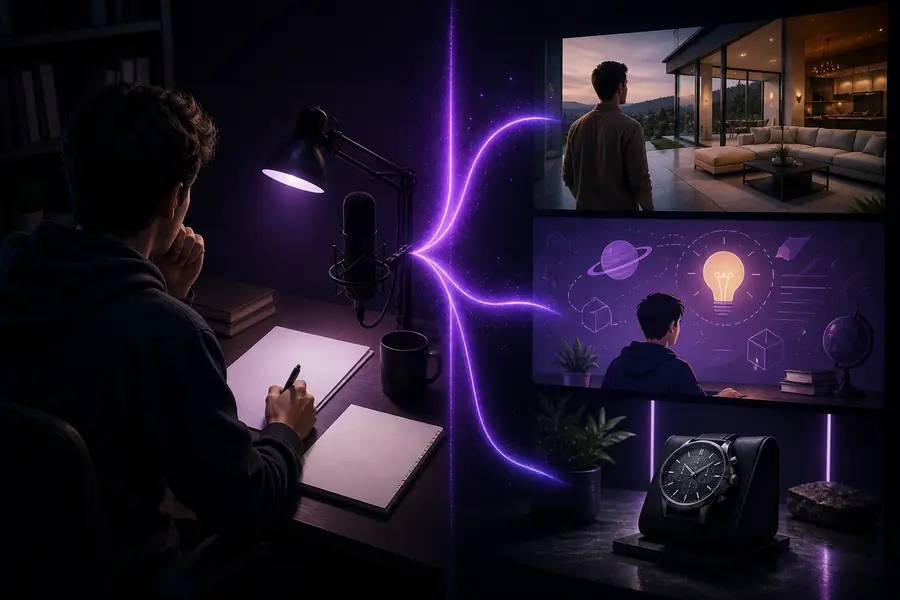
ChatGPT gives you wordsSyllaby AI gives you a scene plan
The before/after shows where the tools meet: the same idea, with one workflow stopping at the script and the other continuing to production.
Capability matrix
The Syllaby vs ChatGPT matrix below is deliberately narrow. It compares only the capabilities that matter when you are trying to publish video, not every feature either product has ever shipped.
Capability
Syllaby AI
ChatGPT
Primary job
Video drafting to publish
General-purpose text assistant
Script hooks and structures
Built-in
Manual prompting
Auto voiceover
Included
No
Faceless video assembly
Included
No
Multi-format adaptation
Included
Manual copy-paste
Open-ended research
Limited
Strong
Code, data and spreadsheets
No
Yes
Learning curve
One focused pipeline
Blank canvas, more setup
Shared pitfalls
Both tools fail in predictable places. Knowing those saves more time than any template. If you are comparing more than two options, the syllaby alternatives free list covers budget-friendly routes, while the syllaby vs invideo ai comparison breaks down another AI editor.
ChatGPT has no production memory
It cannot remember your brand’s tone, b-roll library or platform specs unless you paste them in every time.
Workaround: keep a reusable system prompt or feed the final outline into Syllaby AI’s brand voice settings.
Syllaby AI is not a general assistant
It will not debug code, build a spreadsheet model or reason through a non-video problem.
Workaround: use ChatGPT for those jobs, then bring the result back into your video workflow.
Neither tool fixes a weak idea
A fast pipeline just produces a polished version of a boring concept faster.
Workaround: validate the angle before production. The hook is still a human decision.
Automated voiceover can sound flat
AI voices still need pacing, pauses and emphasis direction for emotional scenes.
Workaround: use the timing controls in Syllaby AI or record pickups for hero sentences.
Our tradeoff
The honest recommendation is not “one tool forever.” It is a two-phase workflow: let ChatGPT win the thinking phase, then let Syllaby AI win the production phase. The decision split below makes that concrete.
When you need a finished video today
Pick Syllaby AI. The hook, voiceover, captions and assembly stay in one pipeline, so a short can go from outline to render in minutes instead of moving across three apps.
When the project is still a thought
Pick ChatGPT. It is better at generating ideas, pressure-testing a hook and summarising research before you commit to a video angle.
When you already have an editor
Pick ChatGPT for the script and use your existing editing tools for assembly. Syllaby AI’s advantage narrows once you do not need built-in production.
3tools collapsed into one workflow when production speed matters
1draft that feeds shorts, long-form and captions in Syllaby AI
0extra handoffs after ChatGPT hands you a script
2×more posts per week when the pipeline stays inside one builder
The fastest setup we see in practice is short: research the topic in ChatGPT, approve the outline, then drop it into Syllaby AI for the final video. That keeps the strengths of each tool and removes the weakest part of both — the silent gap between a great script and a published video.
No. ChatGPT can write an excellent script but cannot produce a video. You still need a video builder or editor to turn the words into scenes, voiceover and captions. Syllaby AI exists to close that gap.
For short-form video, usually yes. Syllaby AI ships hooks, pacing and platform-length constraints built into its templates. ChatGPT is better when you need original angles, research or reasoning beyond video.
ChatGPT’s free tier is useful for text, but you pay with time and extra tools for the video side. Syllaby AI’s free plan covers the full pipeline for a limited number of videos. Compare the output you need, not just the sticker price.
Yes. The Syllaby vs ChatGPT workflow that makes sense is: brainstorm and research in ChatGPT, then move the approved outline into Syllaby AI for production. Most power users land on this hybrid after a few tests.